[New] JumpCloud SaaS Integration
ThreatSpike can now use JumpCloud’s Directory Insights API to pull in Login Events, which are automatically analyzed. If suspicious activity is identified, a SaaS Unusual Login incident will be raised – with our 24/7 SOC team on standby to confirm, investigate, and remediate the issue.
[New] Customizable Device and Account Reporting
Under Analysis -> Secure Score, clients can create their own custom reporting dashboard. Devices can be grouped either individually, as Device Groups, or even at the account level to report across partnered accounts.
Reporting metrics include: Agent Coverage, CIS compliance (across a number of fields like patching and disk encryption), End of Life status, MFA enforcement, and whether important controls like SSL Inspection are applied.
We will continue to expand these metrics and the ways in which you can customize your reporting – aiming for a fully-integrated, single-pane of glass solution flexible enough to report exactly what you need to know.
[New] Availability Monitoring for DNS, SSL, HTTP
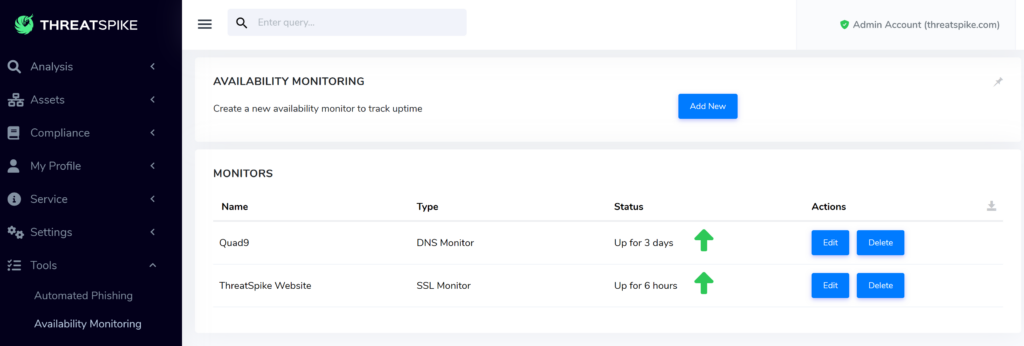
Available (ha!) for initial testing, you can now frequently query your servers: supporting monitoring DNS and websites – with both HTTP and SSL certificate checks.
[New] Automatically Detect Intrusion with Honeypot Files
A new control, named Deception Technology, automatically generates honeypot files on each device. If these files are opened or read in any way – whether by automated scanning or a threat actor snooping around on a machine – an incident is raised, and our 24/7 SOC team will respond immediately.

[New] Devices Show The Network Hardware They’re Connected To
The new Link Layer Discovery Protocol (LLDP) control adds a “Switch Port Information” section to the Device Overview page. This shows the network hardware that a device is directly connected to, and is very useful for troubleshooting networking issues or helping to build out a map of your network topology.
[New] Log Analytics SaaS Integration: fine-tuning Threat Hunting
The Log Analytics Integration now supports:
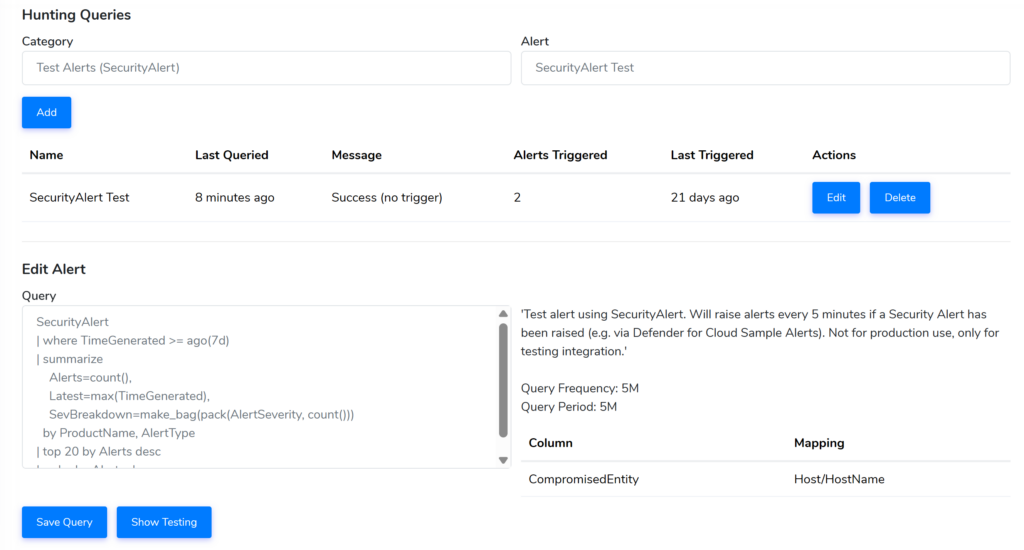
Viewing the last 7 days of ingested logs and threats identified
Fine-tuning Threat Hunting KQL queries, with an inbuilt query explorer
[New] Remote Screen Share: (Optionally) Require User’s Consent
Under Settings -> Devices you can now require that users must click “Accept” on a pop-up window before allowing remote access via ThreatSpike’s Remote Screen Share feature.
Azure and Office 365 SaaS Integration Improvements
Fixed Unusual Login incidents for Office 365 sometimes showing the user ID rather than the username.
Office365 and Azure SaaS Integrations now sync twice as fast.
Graph Security integration now supports “Distribute Events” to redirect alerts to sub-accounts.
Improved user retrieval and matching from Graph Security evidence
Email Gateway Improvements
Just like last month, we have spent a significant amount of time improving the Email Gateway experience. From catching the latest threats to reducing false positives & ensuring stability of the platform, lots of hard work goes on in the background!
For those of you that continue to report phishing emails and provide feedback – thank you.
Portal Security Improvements
Following on from last month where we mandated strong 2FA, we now require reauthenticating using this 2FA before performing sensitive actions like editing account permissions.
There is also now an icon to indicate you are a “Secure User” and can perform these actions.
Agent Performance Improvements (Web Scraping)
On certain websites with SSL Inspection enabled there should now be a significant reduction in CPU and memory usage for our Web Scraping control.
Other Improvements
MacOS devices are now marked as “AV Unknown” instead of “Not Compliant”
Faster loading of E-Learning videos, videos no longer endlessly buffer once finished
Improved the legibility of text on dark backgrounds
Added scrollbars to tables with overflowing text.
Increase email gateway non-delivery report interval from once per 12 hours to once per 3 days.
Device overview now shows and distinguishes between system-wide and user-scoped installed applications