Summary
- A backup keeps copies of your data, while disaster recovery gets your systems running again after an outage or attack
- RTO and RPO set how quickly you need to recover and how much data you can afford to lose, and they shape the whole plan
- Ransomware often tries to delete or encrypt any backups it can reach, so at least one copy should be kept offline or made immutable
- Regular test resorts show whether your backups and recovery plan really work, so any problems are found before a real outage.
Backup and disaster recovery work together, but they serve different purposes. Backup protects your data, making regular copies that can be restored if files are lost or locked by ransomware. Disaster recovery protects your business operations, with a full plan to restore systems and keep the business running after an outage or cyber attack.
In simple terms, a backup answers whether you can get your data back, while disaster recovery answers how quickly the business can work again. The gap between the two often shows up during a real outage. A business may have every file safely backed up, but without a recovery plan, it can still take days to rebuild systems before staff can get back to work.
What is the Difference Between Backup and Disaster Recovery?
IT disaster recovery is the process of restoring a business’s IT systems and data after a serious disruption, so staff can get back to work. Backup is one part of it, making regular copies of data so that nothing is lost for good.
After an incident, a backup restores your data, but on its own it does not bring back the servers and applications the business runs on. Disaster recovery covers that wider process, setting out in advance how each system is rebuilt and in what order. The table below compares them.
| Backup | Disaster Recovery | |
| What It Protects | Copies of files, databases and emails | Whole systems, including servers, apps and user access |
| Question It Answers | Can we get the data back? | How quickly can the business run again? |
| How It Works | Copies data on a schedule to another location | Follows a tested plan to restore systems in a set order |
| Recovery Time | Depends on how much has to be rebuilt by hand | Set by recovery targets agreed in advance (see RTO below) |
| Who Is Involved | Usually the IT team | The IT team plus business leaders, who decide what comes back first |
How Is Backup Used In Disaster Recovery?
In disaster recovery, backups are the copies that systems are rebuilt from. Once the cause of an outage has been found and fixed, the recovery team restores data from the most recent clean backup and checks it before bringing each system back online.
Why Is Backup and Disaster Recovery Important?
Backup and disaster recovery is important because it decides how much a single incident costs the business. Without it, a ransomware attack or failed server can stop work for days and lose data for good.
Downtime also spreads well beyond IT, since staff cannot work and customers cannot be served. If personal data is lost or locked, UK businesses may also need to report it to the ICO within 72 hours. Yet the UK government’s Cyber Security Breaches Survey 2025/2026 found that only 44% of small businesses have business continuity plans that address cybersecurity, down from 53% the year before. The same survey found that 43% of UK businesses, and 65% of medium-sized businesses, had a cyber security breach or attack in the last 12 months.
What Are RTO and RPO?
RTO and RPO are the two targets that shape every disaster recovery plan. The recovery time objective (RTO) is how long a system can be down before the impact on the business becomes unacceptable. The recovery point objective (RPO) is how much data, measured in time, the business can afford to lose.
The table below shows how they could work for a 50-person accountancy firm.
| Measure | What It Means | Example Target | What It Decides |
| Recovery Time Objective (RTO) | The longest a system can be offline | Client files back within 4 hours | How fast the recovery setup needs to be |
| Recovery Point Objective (RPO) | The most data you can afford to lose | No more than 1 hour of work | How often backups needs to run |
For example, if the last backup ran at 9 am and an attack hit at 10 am, the firm loses 1 hour of work, within its 1-hour RPO. If systems are back by 2 pm, it has been offline for 4 hours, meeting its 4-hour RTO, as the diagram below shows.
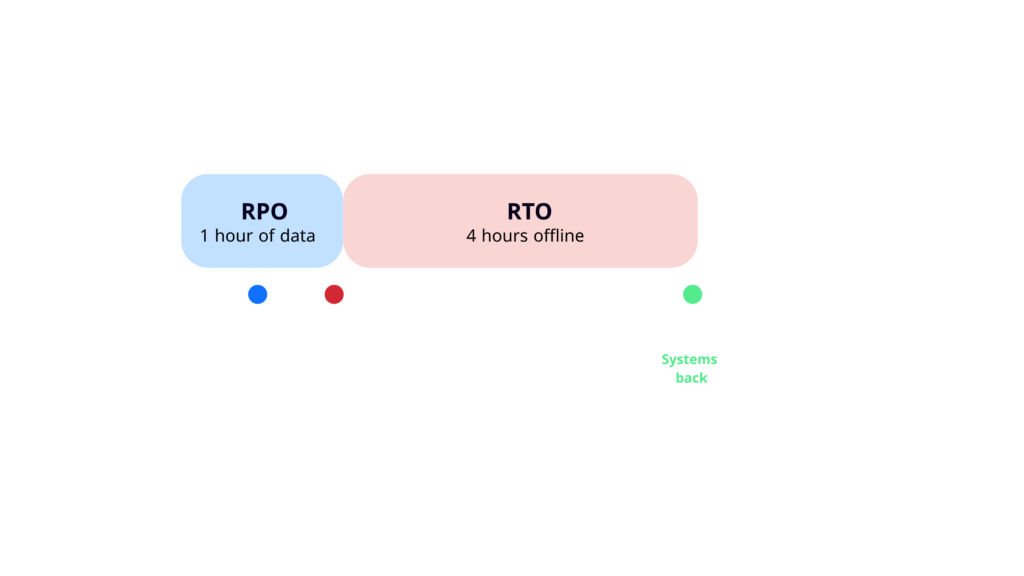
Shorter targets mean faster recovery, but they also cost more, so businesses usually set different targets for different systems. For the accountancy firm, the client file system might need an RTO of 4 hours, while the staff holiday booking system could wait a few days.
What Are the Different Types of Data Breach?
The three main types of data backup are full, incremental and differential backups. Most businesses use a mix of them to balance recovery speed against storage space.
Type of Backup | How It Works | Strength | Trade Off |
Full Backup | Copies everything every time | Quickest and simplest to restore | Takes the longest and uses the most storage |
Incremental Backup | Copies only the changes since the last backup of any type | Fast to run and uses little storage | Slower to restore, as you need the last full backup plus every incremental backup made after it |
Differential Backup | Copies all the changes since the last full backup | Faster to restore than incremental | Grows larger each day until the next full backup |
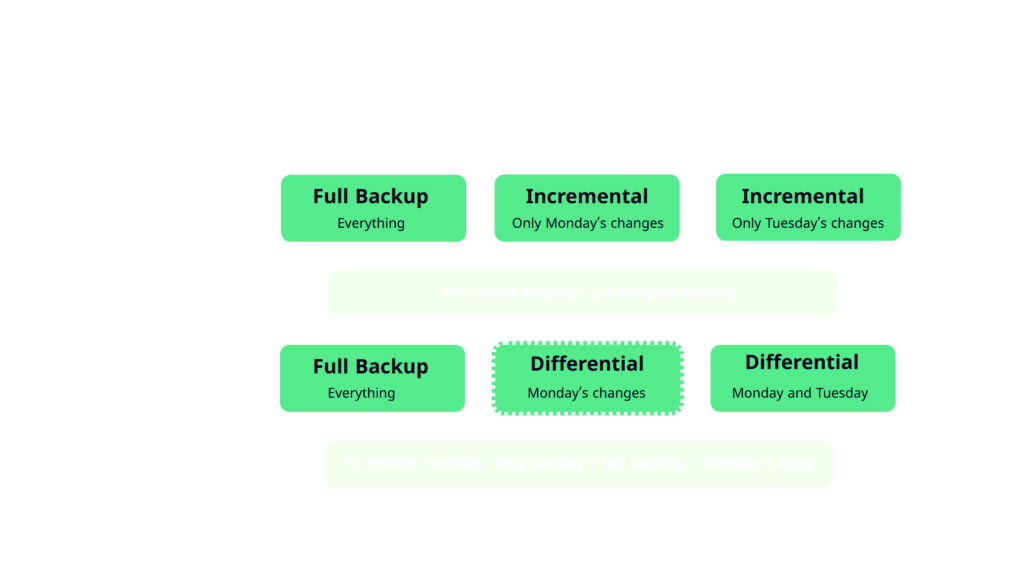
The diagram below shows how this works over three days, starting with a full backup on Sunday. To restore everything on Tuesday, incremental backups need all three copies, while differential backups only need Sunday’s full backup and Tuesday’s copy.
What Is the 3-2-1 Backup Rule?
The 3-2-1 backup rule is a simple guide to keeping data safe. The US Cybersecurity and Infrastructure Security Agency (CISA) describes it as keeping 3 copies of important files on 2 different types of storage, with 1 copy stored off-site. If one copy is lost or damaged there is always another to fall back on.
Many security teams now follow a 3-2-1-1 version, where the extra 1 is an immutable backup. An immutable backup is a copy that cannot be changed or deleted for a set period, even by someone with administrator access, which makes it much harder for attackers to destroy
How Often Should You Back Up Your Data?
How often you back up depends on your recovery point objective (RPO), the amount of data the business can afford to lose. Systems that change all day, such as finance systems and client files, usually need backing up at least daily and often every hour. Systems that rarely change can be backed up less often.
Is Cloud Storage the Same as a Backup?
Cloud file storage and backup are different things. Services that sync files, such as OneDrive or Google Drive, copy changes across every device, so a file that is deleted or encrypted by ransomware can be deleted or encrypted everywhere. A proper backup keeps separate copies from different points in time, so you can go back to a version from before the problem started.
What Is a Disaster Recovery Plan?
A disaster recovery plan is a written, step-by-step guide to restoring IT systems after a serious incident. Disaster recovery planning starts by working out which systems matter most, then sets out who does what and in what order.
US government guidance from Ready.gov, run by the Federal Emergency Management Agency (FEMA), says a plan should start with an inventory of your systems and data, then set priorities for restoring them. A disaster recovery plan should contain:
- A list of critical systems and data, ranked by priority
- RTO and RPO targets for each one
- Where backups are kept and how to restore them
- Named people responsible for each step, with contact details stored away from the systems that might go down
- How staff and customers will be kept informed
- A schedule for testing the plan
Testing is easy to skip, but it is the test that proves the plan works. The UK’s National Cyber Security Centre (NCSC) advises that once you have a backup, “it’s important you know how to restore it, and to check that it contains all your important data.”
What Are the 5 Steps of Disaster Recovery Planning?
Google Cloud breaks disaster recovery into these five steps, and IBM recommends a similar process:
- Risk assessment: Identify what could disrupt your IT, such as a cyber attack, or a power cut.
- Business impact analysis (BIA): Work out which systems the business depends on most, and set an RTO and RPO for each one.
- Develop the plan: Write step-by-step recovery procedures and assign roles, including who keeps staff and customers informed.
- Implementation: Set up the backups and other tools the plan relies on.
- Testing and maintenance: Run regular tests and update the plan whenever your systems change.
What Is an Example of a Disaster Recovery Plan?
The table below shows a simplified disaster recovery plan for the 50-person accountancy firm from earlier.
|
Part of the Plan |
Example |
|
When the Plan Starts |
The IT provider confirms an attack or outage, and the managing director decides to start the recovery |
|
Critical Systems (In Priority Order) |
Client file system first, then email, then accounting software, with the staff holiday booking system last |
|
Recovery Targets |
Client files: RTO of 4 hours and RPO of 1 hour. Holiday booking system: RTO of 3 days |
|
Backups |
Hourly backups of client files, with a daily immutable copy kept in the cloud |
|
Responsibilities |
The IT provider restores systems, while the office manager keeps staff and clients updated and checks whether the breach needs reporting to the ICO within 72 hours |
|
Communication |
Staff are contacted by text message, and clients by email from a separate account |
|
Testing |
A full test once a year, with a test restore of client files every quarter |
A real plan would add more detail, such as step-by-step restore instructions and contact numbers, but the structure stays the same.
How Often Should You Test a Disaster Recovery Plan?
A common approach is to test the full disaster recovery plan at least once a year, with the team working through a scenario such as a ransomware attack and restoring systems in priority order. Every few months, it also helps to run a quick check by restoring a single file or system from a backup, to make sure it is complete and opens properly. The plan should also be restored after any major change, such as moving to a new cloud service.
What Is a Disaster Recovery Policy?
A disaster recovery policy sets the rules that the plan follows. It records decisions such as which systems must be backed up, the RTO and RPO targets, how often the plan is tested and who is accountable for it. The plan explains how to carry those decisions out.
What Is Business Continuity and Disaster Recovery (BCDR)?
Business continuity and disaster recovery (BCDR) is a combined approach that helps a business keep working during a disruption and get back to normal afterwards. IBM describes business continuity plans as proactive, aiming to “maintain operations before, during and right after a disaster”, while disaster recovery plans are reactive, “focusing on how to respond and recover from an incident”.
In practice, business continuity covers the whole business, such as how staff keep serving customers while systems are down. Disaster recovery covers the IT side, setting out how systems and data are restored and in what order.
Take the accountancy firm again. If ransomware locks the client file systems on the morning of a tax deadline, the continuity plan kicks in first: staff switch to a backup phone line and laptop kept off the main network so they can update clients and keep urgent work moving. At the same time, the disaster recovery plan restores the client file system from the last clean backup within its four-hour RTO.
Without the continuity plan, clients would hear nothing for four hours. Without the disaster recovery plan, staff could keep clients informed but could not get any real work done, which is why many businesses plan for both together.
Can Backups Protect You From Ransomware?
Yes, backups are one of the best protections against ransomware, as long as attackers cannot reach them. CISA warns that “many ransomware variants attempt to find and subsequently delete or encrypt accessible backups.” If your backups sit on the same network as everything else, they can be locked in the same attack.
CISA advises businesses to keep offline, encrypted backups of critical data and to test them regularly. An immutable copy, as in the 3-2-1-1 rule above, adds another layer of protection. Backup tools need wide access to do their job, which also makes them a target: in the ConnectWise breach, attackers used a backup service’s own access to reach customers’ Microsoft 365 accounts.
Ransomware recovery also depends on how early the attack is caught. Attackers often spend days inside a network before launching ransomware, and a backup taken during that time may already contain their malware or hidden access. Restoring from it can let the attacker straight back in. Round-the-clock monitoring keeps that window short by spotting the attack early, which makes a clean restore far easier, as our threat detection and response guide explains.
What Happened When Ransomware Hit a Cloud Provider’s Backups?
In October 2026, a ransomware attack hit IDCF Cloud, a Japanese cloud service run by SoftBank-owned IDC Frontier. The attack began at 3:40 am local time on 7 October and forced the company to shut down systems in East Japan, disrupting 495 companies and local governments, according to BleepingComputer.
The provider also disabled customer access to its management consoles in all regions while it checked its security, according to BleepingComputer. For customers whose data and backups were both held in IDCF Cloud, that could mean losing access to both at the same time.
Any business that kept its only backups with the same provider as its systems faced exactly the risk the 3-2-1 rule is designed for. Keeping 1 copy somewhere separate means a single provider’s outage can’t take everything at once.
How Do You Choose Disaster Recovery Solution for Your Business?
The right disaster recovery solution depends on how your business runs. Google Cloud notes that the type you need “will depend on your IT infrastructure, the type of backup and recovery you use, and the assets you need to protect.” Most backup and disaster recovery solutions fall into the groups below.
|
Type of Solution |
How It Works |
Best For |
|
Hybrid (Local and Cloud) |
Backs up to a device on-site and copies it to the cloud |
Businesses with on-site servers that need fast local restores |
|
Disaster Recovery as a Service (DRaaS) |
A provider copies your systems to the cloud and can run them there during an outage |
Businesses that mainly use cloud services and want recovery handled for them |
|
Replication |
Copies servers to a second location almost in real time |
Businesses with very short RTO and RPO targets |
What Is Disaster Recovery as a Service (DRaaS)?
Disaster recovery as a service (DRaaS) is a cloud service where your data and systems are “backed up and hosted on a third-party provider’s cloud infrastructure.”, according to Google Cloud. If your systems go down, the provider runs the recovery so staff can keep working while the main systems are restored.
Whichever type you choose, check these points first:
- Can it meet the RTO and RPO targets you have set for each system?
- Is at least 1 copy offline or immutable, and stored separately from your main systems?
- Are restores tested regularly, and can you see the reports?
- Does it cover cloud services such as Microsoft 365 as well as your own devices?
- Who watches it, and who carries out the recovery if something goes wrong at 2 am?
For many small and mid-sized businesses, the last point matters most. A tool can store copies, but recovering after a ransomware attack takes people who can check that systems are clean and bring them back in the right order.
How ThreatSpike Delivers Backup and Disaster Recovery
At ThreatSpike, backup and disaster recovery are part of the same AI-managed IT and security platform that runs the rest of your IT. The team that sets up your backups is the same team that responds when something goes wrong, so there are no handovers between separate providers in the middle of an incident.
Our managed IT service includes backup monitoring and testing across all your devices and cloud services. We design your recovery plan with you and run simulated disasters to prove it works, with business continuity support as standard. Our 24/7 SOC monitors your IT systems, so it can spot suspicious activity and act on it early, and if systems do go down, we restore them in the order that plan sets out.
Unlimited incident response is included at one fixed price, so you are not charged extra for each incident we respond to. Every month, you also get a report on the health and security of your environment, so you always know where things stand. As one Head of Security put it “Their unwavering ‘can-do’ attitude and readiness to respond anytime throughout the year makes ThreatSpike one of the most responsive organizations I’ve enjoyed working with”
With tested backups and a team ready to act, an outage or attack can be a short disruption your business quickly recovers from. See the platform in action to find out how that could work for your business.