Summary
- Outsourcing is already common, with 64% of small businesses using an external cyber security provider.
- Relying on one IT person leaves your IT without cover during holidays and sick days, and one person cannot cover every skill, especially security.
- Your business stays legally responsible for its data after outsourcing, so check what the provider’s contract says about data handling and breach reporting.
- Agreeing response times for each type of problem is one of the quickest ways to improve IT support.
For most small businesses, outsourcing business IT support gives more cover for less money than hiring your own IT person. Some firms prefer to keep IT in-house for direct control, and many larger ones combine their own team with a provider, an approach called co-managed IT.
The choice affects more than your IT bill. It decides who spots problems and fixes them, and whether your IT knowledge stays with the business when someone leaves.
What Does Business IT Support Include?
Business IT support services include fixing problems when they happen and preventing new ones. For a typical small business, that covers:
- A helpdesk your staff can contact when something goes wrong
- Setting up and removing access for starters and leavers
- Installing updates and security patches
- Running and testing backups
- Managing cloud apps, such as Microsoft 365
- Monitoring for security threats
What Are the Options for Small Business IT Support?
There are five common ways to run IT support for small businesses. The table below compares how each one works, along with its main advantages and drawbacks.
| Model | How It Works | Best Suited To | Advantages | Disadvantages |
| Informal (DIY) | A staff member fixes IT alongside their main job, common in micro-businesses that typically do not have in-house IT departments. | Very small teams with simple setups | No extra cost at first, and the person already knows the business. | IT only gets done when they have time, so updates and backups are easily missed. If they leave, IT is left without an owner until you find someone else, who then has to learn how everything is set up from scratch. |
| Break-Fix | You call a technician when something breaks and pay for each fix, usually by the hour. | Businesses with very few IT problems. | You only pay when something goes wrong. | Problems are only fixed after they happen, and bills can change a lot from one month to the next. |
| In-House | You employ your own IT person or team. | Businesses that want direct control of every IT decision. | Someone on site who knows your systems well. | Hiring is expensive, and there is no cover when your IT person is on holiday or off sick. Your skills are also limited to the people you employ. |
| Co-Managed IT Support | Your IT staff handle daily needs, and a provider adds expertise where in-house IT capabilities are limited. | Businesses with one or two IT staff, or larger teams needing specialist cover. | Adds specialist skills without hiring more people. | Work is split between two teams, so problems can be missed unless the contract is clear about who is responsible for what. |
| Fully Managed IT Support | A provider runs your IT, usually for a monthly fee per user or device, although some still bill by the hour. | SMEs without an IT team, and larger businesses that want one provider to run all of their IT. | A whole team of skills for a predictable monthly cost, with your systems documented. | You have less hands-on control day to day, and the service is only as good as the provider you choose. |
Across the 5 models, the biggest difference is where your IT knowledge lives. It either sits with one or two people, or with a team and a set of records. Our webinar on building an IT department that runs itself shows what the fully managed model looks like day to day.
What Are the Hidden Risks of Relying on One IT Person?
The biggest risk with one in-house IT person is that most of the responsibility, and most of the know-how, sits with them. They often hold the admin passwords and understand how your systems are set up, so if they are away, it is hard for anyone else in the business to step in.
Time away adds up quickly. A full-time employee in the UK is entitled to 5.6 weeks of paid holiday a year, which leaves your IT without cover for more than a month each year, before any sick days are counted. If they resign, their notice period is rarely long enough to hand everything over.
Cost matters too. A UK IT support technician earns between £24,000 and £36,000 a year, according to the National Careers Service, before employer’s National Insurance and pension contributions. Using the per-user ranges in our breakdown of outsourced IT support costs, which run from £30 to £150 per user each month, a 25-person business would pay £9,000 to £45,000 a year for managed support, with cover for holidays and sick days built in.
One person also cannot cover every skill. Helpdesk, networks, cloud apps and cyber security each need different know-how, and security is usually where the gap shows. In ISC2’s 2025 Cybersecurity Workforce Study – a global survey of 16,029 cyber security professionals – 59% cited critical or significant skills needs, and 88% said they had experienced at least one significant cyber security consequence because of a skills gap.
Should You Outsource IT Support?
For most businesses, yes, and many already outsource at least part of it. The government’s Cyber Security Breaches Survey found that 64% of small businesses have an external cyber security provider. Outsourced IT support for SMEs usually makes sense for these reasons:
- You get a range of skills for one monthly fee. Helpdesk, networks, cloud and security are covered by a team, instead of resting on one person.
- Costs are easier to plan. A fixed monthly fee is simpler to budget for than hourly call-out charges or a new salary.
- Knowledge stays with your business. A good provider documents your systems, so support carries on when people leave.
- Security gets proper attention. The Verizon 2026 Data Breach Investigations Report found that “Ransomware grew again to 48% of all breaches, up from 44% from the previous year.” Defending against attacks like these takes specialist skills and round-the-clock monitoring, which is more than one person can provide.
A provider will have access to your systems and data, so who you choose matters as much as whether you outsource. When you compare providers, look closely at how each one charges, since many traditional MSPs still bill separately for each ticket or project.
What Does Business IT Support Look Like for Different Businesses?
The four examples below show what IT support for businesses in different sectors looks like day to day, and how outsourced support fits.
- A 10-person law firm usually has one person looking after IT on top of their main role, so updates and backups can slip down the list. This is a real risk when the firm holds confidential client files. Outsourced IT support for law firms puts a provider in charge of updates and backups, with someone watching for anything suspicious, which helps keep client files safe.
- A hotel group, like Regency Hotel Management, with several properties relies on its booking system and guest Wi-Fi day and night, and has guest and payment data to protect at every site. There is often no IT person on site when something goes wrong. A fully managed provider with 24/7 monitoring can watch every property from one place, and its helpdesk can step in at any hour.
- A 120-person manufacturer may have a small IT team that knows the factory systems well, but it cannot be on call every night. If a machine loses its connection overnight, the problem might not be spotted until production stops the next morning. A fully managed provider that monitors around the clock would watch the systems overnight and fix issues as they happen.
- A financial services firm, like Expedition Growth Capital, needs its systems running at all hours and its records ready for audit. A helpdesk that only reacts when something breaks leaves gaps, and as our webinar on regaining control of IT explains, hiring more people rarely fixes that. A fully managed IT provider can take over the whole IT environment, with specialists watching security, which can also bring costs down.
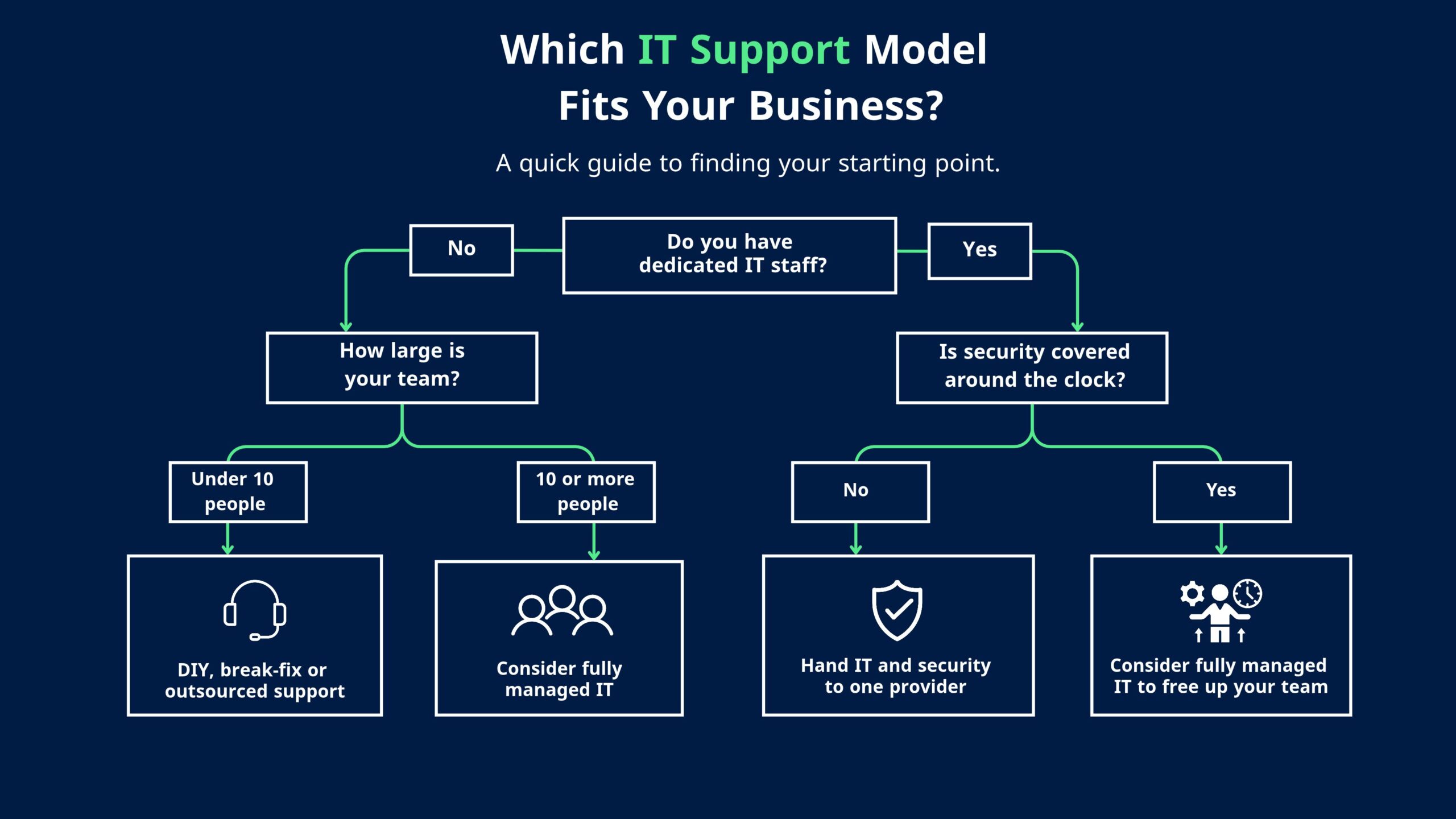
Each business in the examples above starts from a different place, depending on its size and the IT help it already has. If you are not sure where your business fits, the flowchart below gives a quick way to find your starting point.
How Can Small Businesses Improve Their IT Support?
The quickest improvement is agreeing how fast each type of problem gets fixed. Without agreed response times, a printer jam and a company-wide email outage end up in the same queue.
Sort problems into priority levels and agree a target for each one with your IT support team or provider. The NCSC says a response time of under 1 hour is standard for urgent issues and 1 business day for general requests. The table below is a sample of how you could set targets in line with that.
| Priority | Example Issue | Sample Response Target |
| Critical | The whole office cannot work, or there is a suspected cyber attack. | Within 30 minutes |
| High | One team or a key app is down. | Within 2 hours |
| Medium | One person has a problem, but a workaround exists. | Within 4 hours |
| Low | A request, such as installing new software. | Within 1 business day |
Whatever targets you choose, put them in writing so both sides can be held to them.
There are also two security steps that take very little time to set up. The first is installing security updates as soon as they are released, because attackers often get in through known weaknesses that have not been fixed. According to the Verizon 2026 Data Breach Investigations Report, “Exploitation of vulnerabilities is now the most common initial access vector for breaches. It has risen to 31% in this year’s reporting dataset, while credential abuse—the previous leader—is down to 13%.”
The second is turning on two-step verification for email and admin accounts, which protects you when a password gets stolen.
Who Is Responsible for Your Data When You Outsource IT?
When you outsource IT, your business is still responsible for its data. In UK data protection law, your business is the “controller”, and an IT provider that handles your data for you is a “processor”. The ICO uses this exact example: when a bank hires an IT firm to store its data, the IT firm is the processor and the bank stays in charge. The ICO also says the controller is “primarily responsible” for its own compliance and for making sure its processors comply too.
In practice, your contract should include data processing terms and say how quickly the provider will tell you about a breach. A provider with wide access to your systems can also become a route for attackers. The Verizon 2026 Data Breach Investigations Report notes that “breaches with third-party involvement have increased by 60% from last year’s dataset, reaching 48% of total breaches.” The 2025 M&S attack began with a call to a third-party service desk, as we covered in our guide to what a SOC is and whether your business needs one.
Some regulated firms carry even more of this responsibility. The FCA’s operational resilience rules apply to firms such as banks, building societies, insurers and payment firms. These firms must set a limit on how long their most important services can be disrupted, and stay within it.
The FCA has made clear that “the failure to remain within impact tolerance is your responsibility”, even when the problem sits with a third party. If your business falls under these rules, your IT contract should set out how quickly the provider will get key systems running again.
These risks are manageable when you choose the right provider. Look for recognised certifications such as Cyber Essentials Plus or ISO 27001, and a contract that covers data handling and breach reporting. The questions below can help you check.
What Questions Should You Ask an IT Support Company?
The NCSC’s guidance on choosing a managed service provider says “it’s important to ensure that MSPs take cyber security seriously”. These questions will help you compare providers of IT support for business.
- What are your response times, and are they in the contract? A good answer gives a target for each priority level, written into a service level agreement (SLA).
- Which security certifications do you hold? Cyber Essentials is the UK government’s baseline. According to the NCSC, organisations with Cyber Essentials are 92% less likely to make a cyber-insurance claim.
- Which costs sit outside the monthly fee? Ask specifically about security incidents and projects such as office moves. Our breakdown of what an MSP’s monthly fee leaves out shows where these extra costs usually come from.
- How do you handle our data, and what happens if we leave? A good provider has data processing terms ready, and explains its exit process before you sign.
How ThreatSpike Delivers Business IT Support
ThreatSpike is an AI-managed IT and security platform, delivered as a fully managed service: our technology and our engineers run all of it, so nothing is split between your team and ours. When you move your IT to us, onboarding starts with a full audit of your existing IT, so there is a clear picture of your systems and how they are run.
The audit leads to an agreed 30-, 60- and 90-day roadmap. From then on, a dedicated forward-deployed engineer works alongside our AI, which handles issue detection and ticket resolution. Your engineer is your main contact for weekly reviews and escalations, so you always know who to call. ThreatSpike holds ISO 27001 and Cyber Essentials certification, regularly audited by BSI, and is CREST-certified for penetration testing.
All IT project work, such as migrations and infrastructure redesigns, is included in one fixed monthly price, with no day rates or change orders. Our managed SOC also watches your systems 24/7. When it spots a security threat, the platform responds automatically within 2 to 5 minutes, inside the NCSC’s under-1-hour standard covered earlier. Instead of using one provider for IT and another for security, we run both, so one team is accountable for all of it.
Expedition Growth Capital moved its IT and security to ThreatSpike from an external MSP and several separate tools. It cut its monthly IT costs by 38%.
If your IT is split between an MSP and separate security tools, as Expedition’s was, talk to our team about what moving to ThreatSpike would look like.