
A lot moved across the platform in June. Ticketing becomes a proper collaborative workspace, SQL Server monitoring goes from basic to comprehensive, and the Knowledge Base gains the kind of permission controls and team features that make it genuinely useful at scale. Here’s everything that landed.
New Features This Month
Sensitive Information Shouldn’t Travel By Email
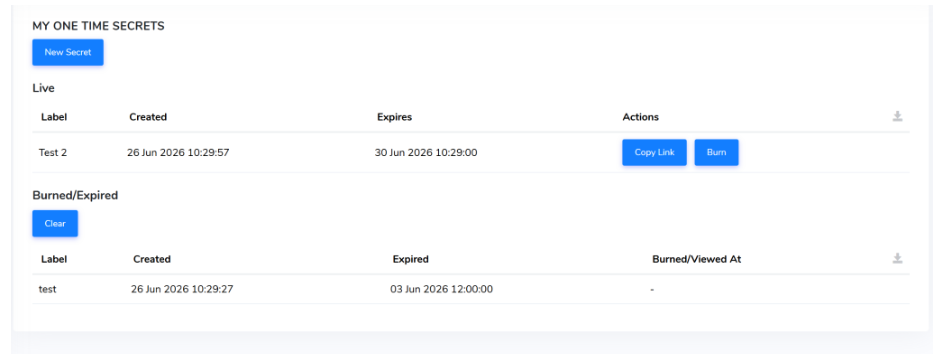
Need to create a sensitive value securely? You can now generate a one-time secret that permanently destroys itself after a single view.
When you need to share a password, API key or credential with someone, email is the default. It sits in inboxes indefinitely, gets forwarded, shows up in search results years later. One-time secret sharing fixes that. You can now generate a one-time secret link instead: send it once, and the moment it’s been viewed, it destroys itself permanently. No trail, no residual risk, no wondering who still has access to something they shouldn’t.
Ticketing, Rebuilt For Collaboration
Five updates have shipped together this month: a visual refresh, bulk editing, @mentions, built-in alerting, and tighter privacy controls.
LESS BACK-AND-FORTH, MORE CONTEXT IN THE TICKET
Refreshed Ticket Views With Rich Text & Screenshots
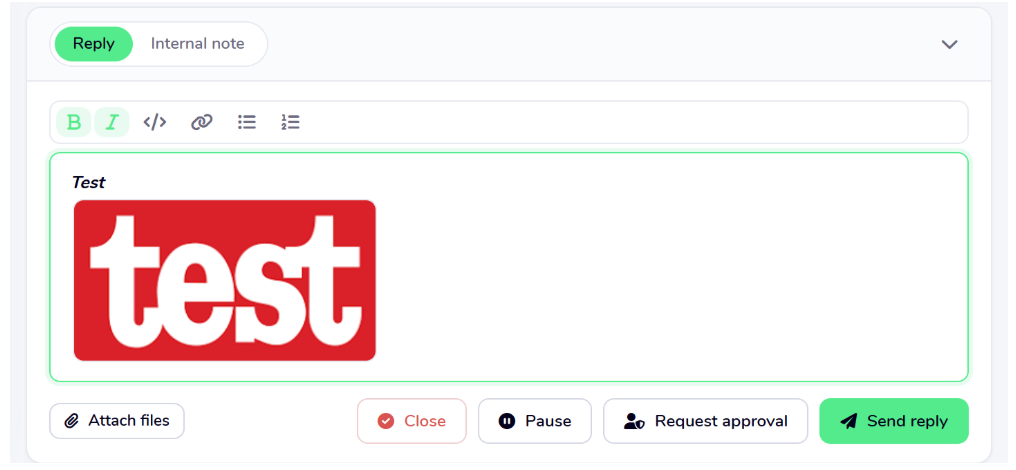
Anyone who’s managed a busy queue knows the pattern: a ticket comes in, the description is vague, and three messages later you finally have enough information to actually do something. The Ticket Dashboard, Ticket View, and Form have all had a visual refresh. Comments now support rich text formatting, and you can paste screenshots directly into a ticket. This means that the person handling the issue gets the full picture from the start, without a chain of follow-up messages to piece together what’s actually happening.
STOP UPDATING TICKETS ONE AT A TIME
Bulk Ticket Updates
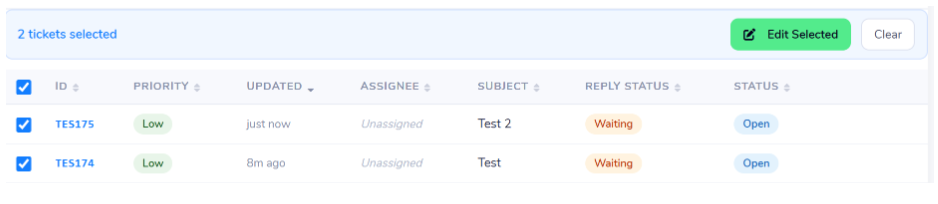
When you’re working through a backlog or redistributing work after a team change, updating tickets individually is the kind of low-value admin that eats time without anyone noticing.
You can now select tickets using the checkboxes, or grab the lot with the header checkbox, hit Edit, and apply priority, assignee or team changes across your whole selection at once – saving a significant amount of time.
LOOP THE RIGHT PEOPLE IN WITHOUT LEAVING THE CONVERSATION
Tagging & Mentioning in Tickets
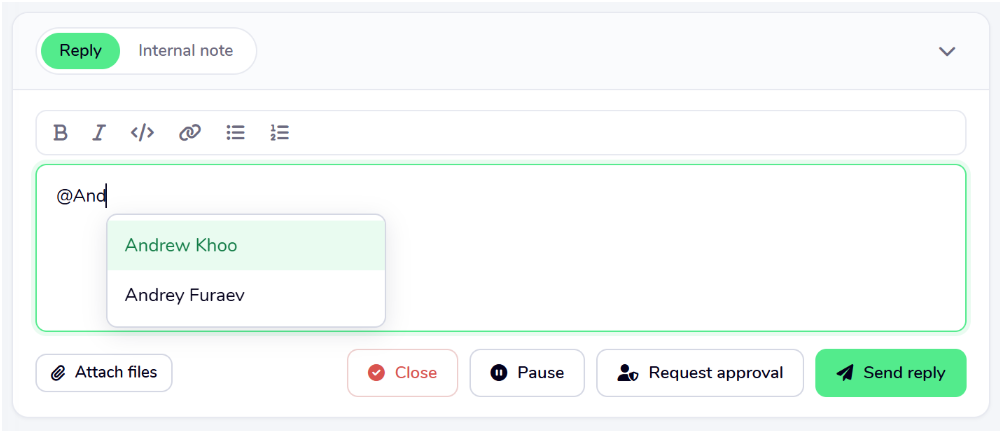
Type @ in a ticket to tag a colleague; autocomplete suggests names as you go, and they’re notified immediately without the conversation ever leaving the ticket. The alternative? Spotting that someone needs to know something, switching to a separate message, hoping they see it
EVERY ALERT IN ONE PLACE, NOT SCATTERED ACROSS THE PLATFORM
Alerting & Escalation Built Into Ticketing
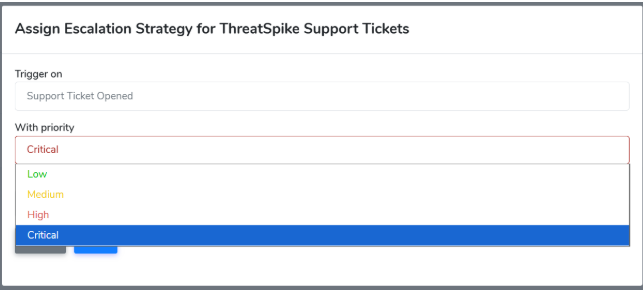
Previously, alert and escalation strategies lived separately from ticketing, which meant managing two places for what is ultimately the same workflow. They now live directly within general support ticketing. Configure automated email, SMS or phone call alerts for any ticket that meets your criteria; other parts of the platform, availability monitoring included, now raise their alerts as support tickets too.
Full Visibility Into Your Database Estate
SQL Server monitoring has expanded substantially this month, from basic setup to end-to-end visibility, with alerting built in at every level.
KNOW WHEN A JOB FAILS BEFORE ANYONE ELSE DOES
Scheduled SQL Server Job Visibility & Health
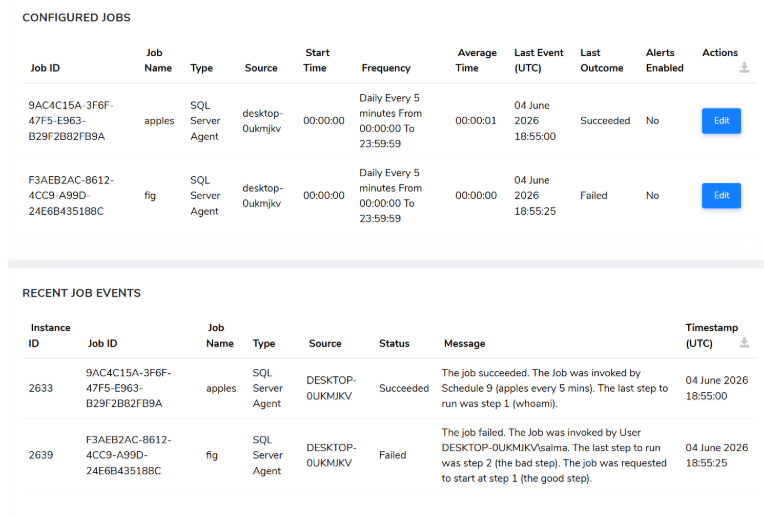
The usual discovery pattern for a failed database job goes something like this: a system sends an email at 3am, nobody sees it until morning, and by then the downstream impact has already done its work. You can now view dynamic SQL Agent job information and full run history directly in the platform; when a job fails or fails consecutively, a support ticket is raised automatically at the appropriate priority level. No more catching up to problems that have already compounded.
THE DAILY PICTURE, BEFORE THE DAY STARTS
Daily SQL Server Job Report Email
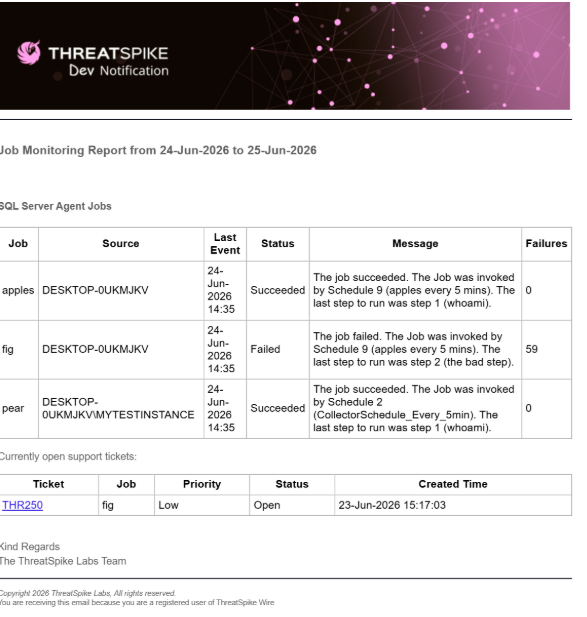
Opt in to a daily email summarising the previous day’s job runs: status, failures, and any related open support tickets. It’s a 60-second read that tells you exactly where things stand before anything else lands in your inbox.
There’s now a version of the morning where you already know the state of your database estate before your inbox tells you otherwise. Short, specific, and there before the day starts pulling your attention elsewhere.
WHEN A SERVER GOES DOWN, THE RIGHT PEOPLE FIND OUT IMMEDIATELY
SQL Server Failure & Offline Alerting
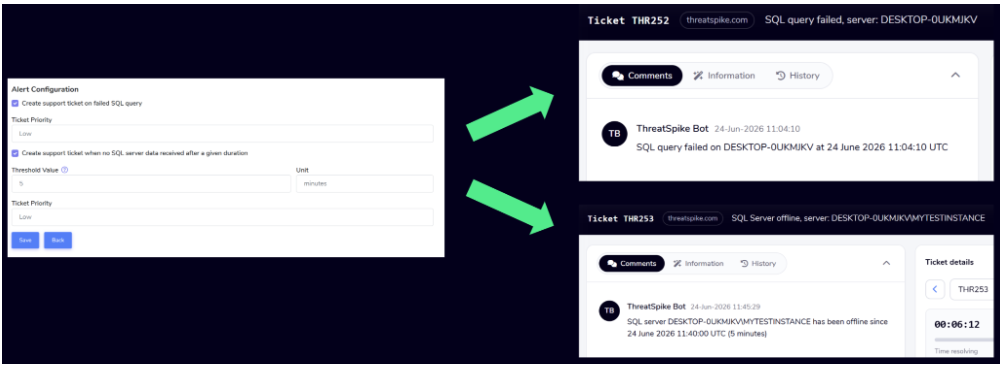
A server dropping offline quietly is one of those problems that compounds with every hour it goes unnoticed. You can now configure alerts for servers offline beyond a set duration or queries that fail, and a prioritised support ticket is raised automatically. The gap between something going wrong and someone acting on it gets a lot shorter.
FINDING & IDENTIFYING SERVERS NO LONGER TAKES LONGER THAN IT SHOULD
Faster & Clearer SQL Server Set Up
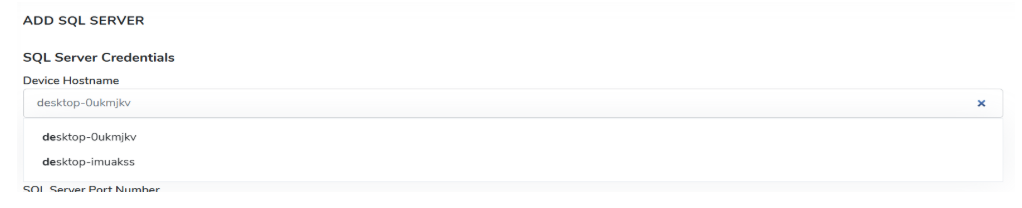
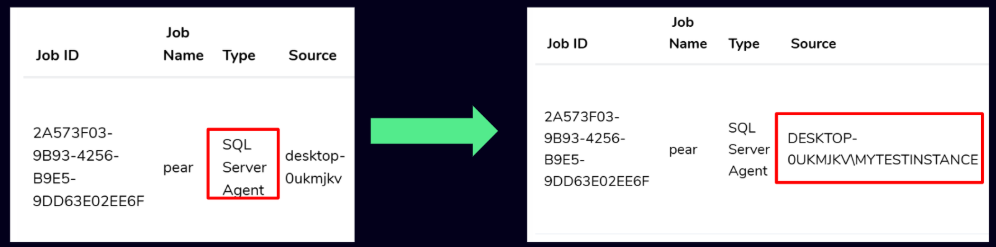
Adding a SQL Server to monitor now comes with smart device suggestions as you type and once you’re in the Configured Jobs view, the SQL server name is shown as the source for each job; when you’re running multiple servers, knowing exactly where each job lives is basic information that was harder to get to than it had any right to be.
A Knowledge Base Your Whole Organisation Can Rely On
The Knowledge Base has had its most substantial update since launch. A set of features that together shift it from a document library into a properly collaborative, permission-controlled workspace.
Secure Link Sharing
Giving someone access to a Blueprint has always meant giving them access permanently, with no straightforward way to walk that back. Blueprints can now be shared via secure links, with editor and temporary-access options available; revoke a link at any time to cut off access immediately. Particularly useful when you’re working with contractors or external partners whose involvement has a natural end date.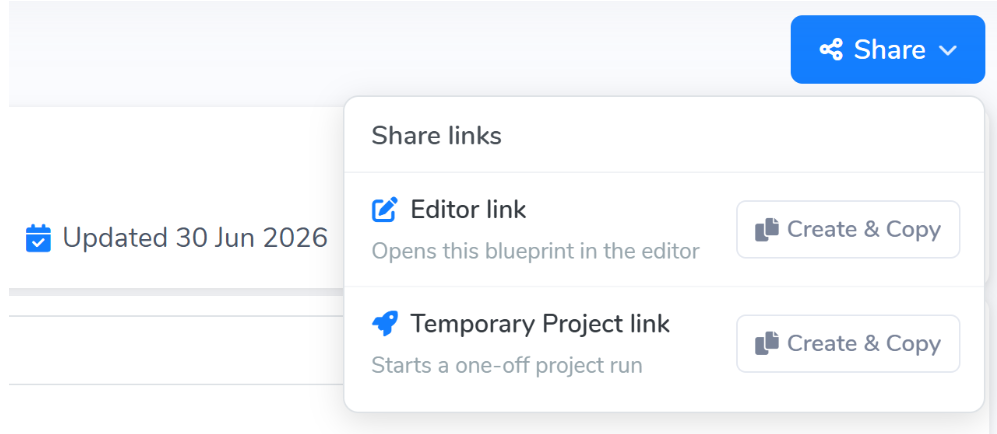
WORK LANDS WITH THE RIGHT PERSON, WITHOUT A MANAGER BROKERING IT
Skill-Based Task Matching
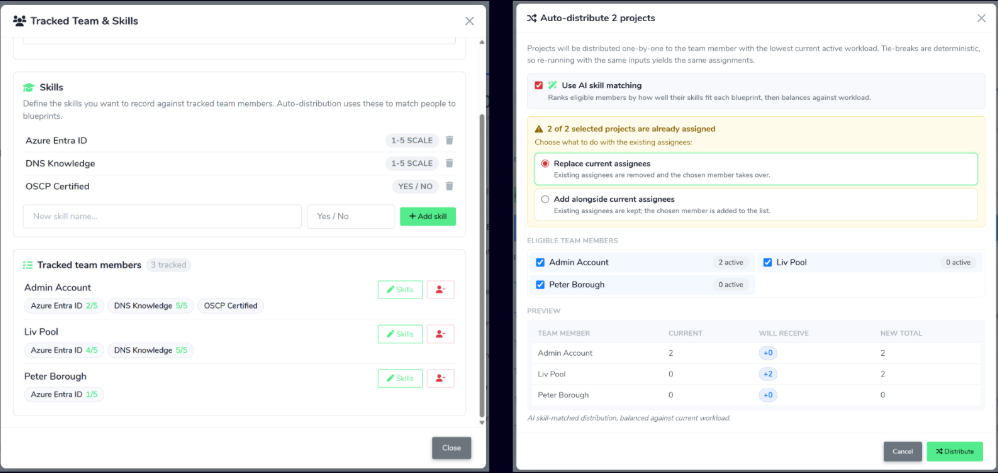
Projects can now match tasks to team members based on their skills and current workload automatically.
In most teams, distributing work is a manual exercise: someone scans the queue, considers who’s free, makes a call. It’s fine at a small scale; it doesn’t hold up as teams grow. Now, the right work reaches the right person without anyone having to orchestrate it.
File Attachments in Blueprints
The friction this fixes is small but persistent: someone follows a Blueprint, hits a step that references a document, and then goes off to find it – breaking the flow, losing time, occasionally finding the wrong version. Files can now be attached directly to individual Blueprint steps. Supporting documents, images and reference material sit exactly where the work is.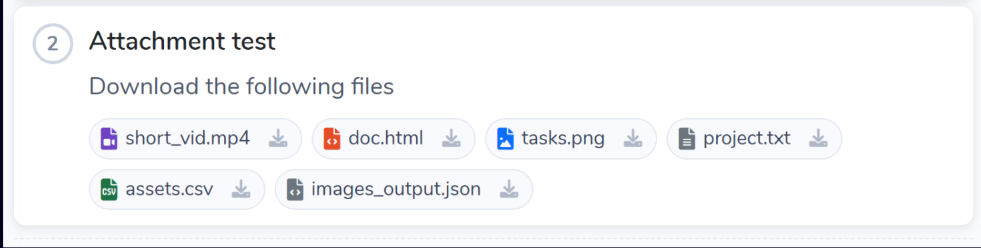
Secure Credential References
Blueprints can now reference stored credentials directly, with each user seeing only what they’re authorised to access. Building processes that reference credentials has always required handling access separately, outside the Blueprint itself, which either means duplicating information somewhere insecure or breaking the process every time someone needs a credential they can’t easily find. Now, the process stays intact and nobody sees anything they shouldn’t.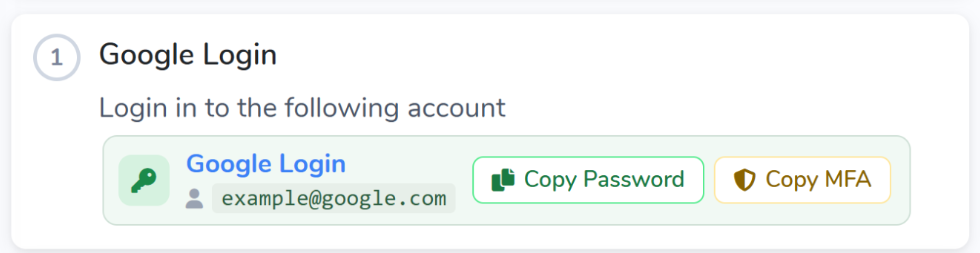
Embedded Video Support
Written instructions have a ceiling, particularly for anything procedural where sequence and visual context are doing most of the work. Embed video directly into Blueprint steps, alongside a new parents list for navigating between related content. For the kind of processes where a written description leaves too much to interpretation, this closes the gap.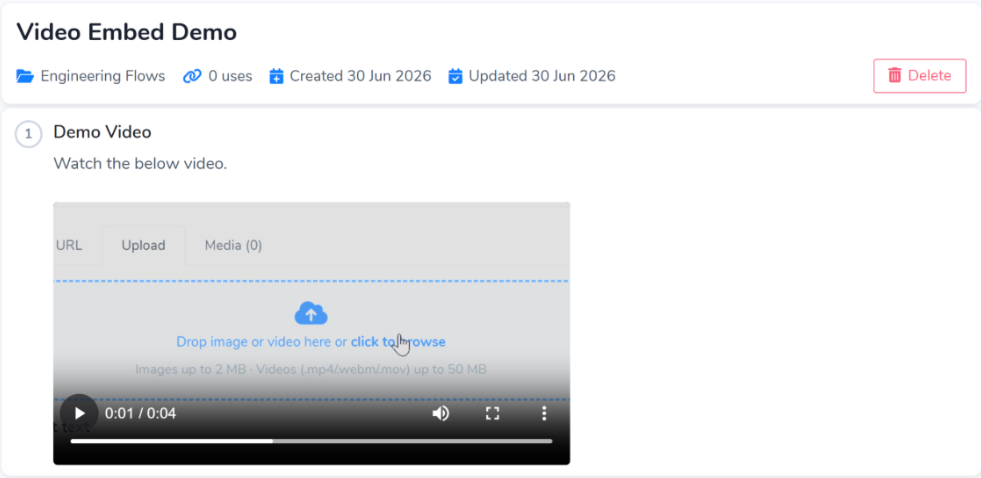
Folder-Level Permissions
As Knowledge Bases grow, the absence of granular permissions becomes a real problem. Content gets changed by the wrong people, or accessed by teams it wasn’t intended for, and by the time anyone notices the damage is already done. Set view and edit permissions by group at the folder level; the right teams see and control what they should, and everything else stays out of reach.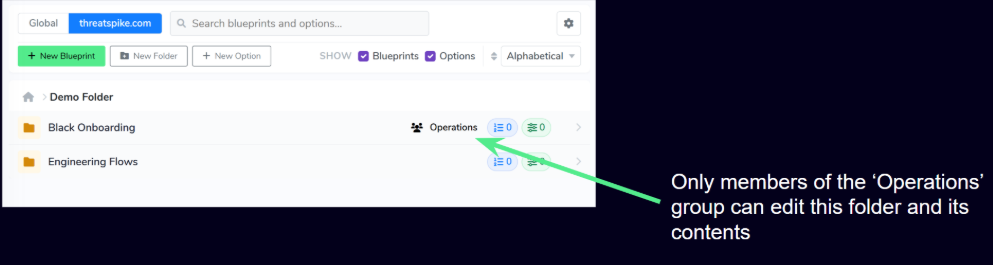
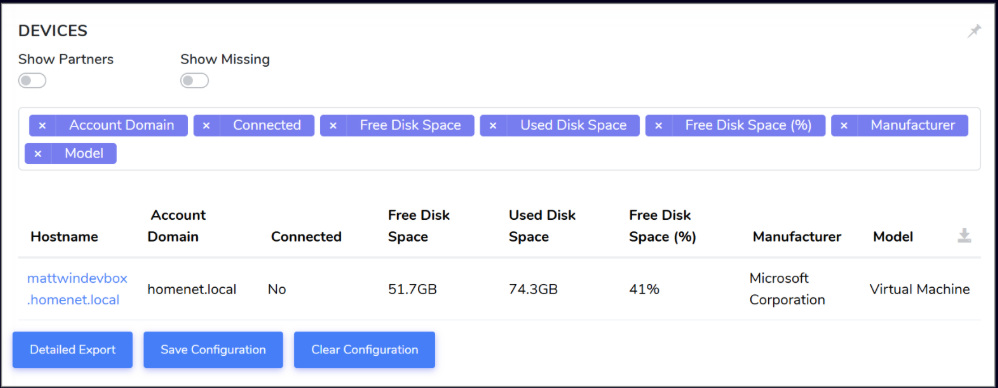
Disk Space Data, Now Included In Every Device Export
Disk Space Statistics in Device Exports
Device exports now include disk space statistics: free space, used space and free space percentage. A small addition, but a useful one when you’re monitoring capacity across a large estate and need that data outside the platform for reporting or capacity planning.
Other Improvements and Fixes
Improvements:
- Ticketing: Tickets assigned to private teams are now hidden from non-members even when raised by email, closing a gap that quietly existed until now.
- Ticketing: Editing a ticket from the Dashboard is smoother, with improved assignee and team suggestion boxes to help you route tickets faster.
- Ticketing: Ticket update emails for the Customer Support Tickets channel now include the account domain, making it immediately clear which account a ticket relates to when you’re managing multiple.
- Ticketing: A new data query lets you export ticket list information directly into ThreatSpike Apps for richer reporting and analysis outside the standard views.
- SQL Server Job Monitoring: A new job history data query enables richer monitoring within the Apps platform.
- SQL Server Job Monitoring: Job Monitoring has moved into the Settings menu for quicker access.
- SQL Server Job Monitoring: Improved logging when a SQL Server connection fails, making troubleshooting faster and clearer.
- Ticketing: Tickets assigned to private teams are now hidden from non-members even when raised by email, closing a gap that quietly existed until now.
- Ticketing: Editing a ticket from the Dashboard is smoother, with improved assignee and team suggestion boxes to help you route tickets faster.
- Ticketing: Ticket update emails for the Customer Support Tickets channel now include the account domain, making it immediately clear which account a ticket relates to when you’re managing multiple.
- Ticketing: A new data query lets you export ticket list information directly into ThreatSpike Apps for richer reporting and analysis outside the standard views.
- SQL Server Job Monitoring: A new job history data query enables richer monitoring within the Apps platform.
- SQL Server Job Monitoring: Job Monitoring has moved into the Settings menu for quicker access.
- SQL Server Job Monitoring: Improved logging when a SQL Server connection fails, making troubleshooting faster and clearer.
Not using ThreatSpike yet? Book your free demo with one of our expert consultants to see all these features and more, in action.